
A terminal for Polymarket esports markets
Dota 2 on Polymarket, in decimal odds. Your funds stay in your wallet.
Same Polymarket markets and order book, built around esports — Dota 2 first, plus CS2, LoL and Valorant. Decimal odds across the book, the ticket and your limit orders; series and map markets on one page; no PickBan fee on limit orders. Deposits land in your own wallet, and you can export the key.
- Sign in with email or your own wallet
- Deposit USDT (TRC-20) from $2, or from other chains
- Export your wallet key
Opens @pickban_bot — two quick questions and you're on the waitlist. Closed beta starts Thursday, October 22.
The beta waitlist is closed right now. News is in the PickBan channel.
18+ only · Buying an outcome is risky: you can lose everything you put in · Not financial advice · Not available where Polymarket is restricted · Not affiliated with Polymarket
On the markets now
Polymarket esports market data, prices shown as decimal odds. Market prices — not predictions, not advice.
No live matches right now. Coming up next:
Odds = 1 ÷ outcome price, so 54¢ is 1.85. The list refreshes every 20 seconds, but prices here can lag by a couple of minutes — the live book is on the match page. Volume is all Polymarket traders, not PickBan.
Full board: Dota 2, CS2, LoL, Valorant →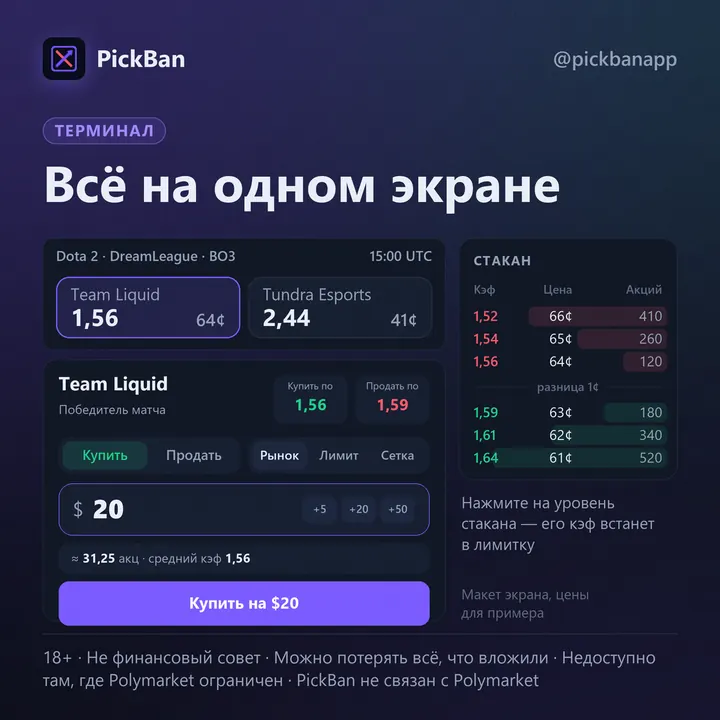
Same books. A better workflow for esports.
Your orders go straight to the Polymarket order book — same prices, same rules, same resolution as polymarket.com. PickBan changes how you work with them.
- Decimal odds everywhere — in the book, the ticket, limit orders and grids. Cents stay in small print so you can cross-check.
- The whole match on one page — the series market and every map market, with the map score on the card.
- Book next to the ticket — tap a price level and its odds drop into your limit order.
- Tap-to-buy — set an amount, then a tap on the odds buys at market within the slippage you set. It switches off on reload or after 2 hours idle. With an external wallet you still confirm each order in it.
- Instant — fires on press, not on release, and never asks "Sure?". The regular Buy button double-checks from $100. It won't sweep past a gap where the next price in the book is twice as bad.
- Grids — several limit orders in one go between two odds, size split evenly; expiry 5 min, 15 min, 1 h or until cancelled. Works for selling too.
- Take out initial — sells just enough shares to get back what you put in, after fees; the rest stays in the position. If the position is down, the button tells you so.
- The total before you confirm — shares, average odds, fees in dollars (Polymarket + PickBan) and odds after fees. If the book is thinner than your size, it tells you how much will actually fill. Rejected orders come with a plain reason.
- Notifications — deposit spotted and credited, order filled or not.
Market orders cost 0.5% more than on polymarket.com — that's our fee. Limit orders carry no PickBan fee.
Three steps to your first position
-
Sign in.
Email (a one-time code, no password) or your own wallet: MetaMask, Rabby, OKX, Coinbase Wallet, Rainbow, WalletConnect. Already trade on polymarket.com with that wallet? PickBan connects to the same account — same funds, same positions.
-
Fund it — or don't.
New wallet: deposit through the Polymarket bridge — USDT on Tron (TRC-20) from $2, or BNB Chain, Polygon, Solana, Arbitrum, Base, Optimism, Ethereum. Usually credited within a couple of minutes. Send only the coin and network shown on the deposit page. Connected an existing account? Your balance is already there.
-

Pick a map and a price.
At market, by tapping the odds, with a limit order or a grid. Fees and odds after fees are shown in the ticket before you confirm.
Fees, in numbers, before you click
PickBan charges 0.5% on market orders, on top of Polymarket's own fee. Limit orders: 0% PickBan. On Dota 2 markets Polymarket's taker fee is 5% × price × (1 − price) per share. As a share of what you pay for the shares, that's 5% × (1 − price): under 1% on heavy favourites, up to 5% on long shots.
All-in cost of a market buy, Dota 2:
| Odds (price) | Polymarket | PickBan | Total | Odds after fees |
|---|---|---|---|---|
| 1.11 (90¢) — heavy favourite | 0.5% | 0.5% | ≈1.0% | ≈1.10 |
| 1.50 (67¢) | 1.7% | 0.5% | ≈2.2% | ≈1.47 |
| 2.00 (50¢) — coin flip | 2.5% | 0.5% | ≈3.0% | ≈1.94 |
| 3.00 (33¢) | 3.3% | 0.5% | ≈3.8% | ≈2.89 |
| 5.00 (20¢) — underdog | 4.0% | 0.5% | ≈4.5% | ≈4.78 |
| Resting limit order filled by someone else | 0% | 0% | 0% | as set |
- Percentages are of the shares' cost at the book price; odds after fees is what each dollar you put in, fees included, pays if the outcome wins. The ticket shows the exact dollar figure before you confirm.
- A limit order that crosses the book on arrival fills as a market order and pays both fees.
- Selling at market follows the same rules; selling with a limit order carries no PickBan fee.
- Polymarket's fee can differ on other games — the terminal uses each market's own rules.
- Polymarket collects PickBan's fee at the moment of the trade. We never charge your wallet separately.
Same fee whether your outcome wins or loses. PickBan doesn't take the other side — another Polymarket trader does. We don't care who's right, so we have no reason to limit traders who win.
Where your funds are — check it yourself
Short answer: in your own wallet, not with us. Here's how to verify that without trusting us.
1Funds sit in your own Polymarket wallet.
PickBan has no account your money passes through: deposits go through the Polymarket bridge straight to your wallet.
Check: paste your wallet address from Account into polygonscan.com — balance and full history are there.
2PickBan doesn't hold the key.
Email sign-in: the wallet is created by Privy, a separate wallet-infrastructure company (owned by Stripe since 2025). The key is split into parts and kept in Privy's secure system. We never see or store it — the site only asks Privy to sign a trade or a withdrawal when you press a button. External wallet: the key stays in it and you approve every signature.
3Take your key with you.
Account («Кабинет») → Wallet key («Ключ от кошелька») → Export («Выгрузить»). Import it into MetaMask or Rabby and connect on polymarket.com where it's available: same funds, same positions.
Check: once, in advance, that the address on polymarket.com matches the one in your PickBan Account.
What PickBan can't do:
- move funds out of your wallet while you're not on the site — there are no user keys on our server, and Privy only signs in your open browser;
- cancel your trade or change how a market resolves — Polymarket resolves markets by their rules;
- change the price — orders in the book set it;
- restore access if you lose your email and never exported the key — nobody can, not us, not Privy.
How to avoid scammers
PickBan people never DM you first. Beta invites come only from @pickban_bot, to people who signed up there themselves — or by email from support@pickban.app if you left your email on this page. We never ask for your key, seed phrase or email code.
Our accounts: pickban.app, @pickbanapp (channel), @pickban_bot, @pickban_chat (beta chat), @pickban_support, support@pickban.app. Anything else isn't us.
(page in Russian)
What's not there yet — said upfront
- An English interface: the terminal is in Russian for now. This page and the bot speak English.
- A mobile app: PickBan runs in the browser.
- Copy trading, stop-losses or other automatic exits.
- A referral programme.
- Predictions or signals: PickBan is a terminal.
- Speed numbers: we haven't measured order or withdrawal times with real money yet, so we don't promise any.
Selling and withdrawing with real money are being verified in the closed beta. Anything new goes out in the channel first.
Closed beta from October 22
Starting Thursday, October 22, we invite people from the waitlist in turn — only from countries where Polymarket is available. Small groups, so we can help everyone.
- Join via the bot. Two questions: is PickBan open where you are right now, and do you already trade on Polymarket.
- Wait for your invite. It arrives from @pickban_bot in the same chat.
- Do your first full loop with us. We help you deposit, buy, sell and withdraw.
- Tell us what's clunky. That's all we ask.
Public market links come only after 20 testers complete the full loop: deposit → buy → sell → withdraw. No dates promised. How the beta goes — what works, what broke, how long withdrawals took — we post in the channel. Use an amount you're comfortable losing.
The bot stores your username, Telegram ID, language, link tag and your answers to two questions — only to send the invite and see which links work. We don't ask for your name, phone or wallet address. To remove yourself, send /stop. Privacy
No Telegram? Leave your email
Where PickBan doesn't work
PickBan only works where Polymarket allows opening positions. These are Polymarket's own restrictions, not our choice. We don't help or advise anyone to circumvent them — Polymarket may freeze funds for that. Messages with circumvention tips are removed from our chats.
Russia, Belarus, the United States, the United Kingdom.
- EU: Belgium, France, Germany, Italy, Poland, Slovakia.
- Asia and Oceania: Australia, Myanmar, New Zealand, North Korea, Singapore, Taiwan, Thailand.
- Americas: Brazil, Cuba, Nicaragua, US Minor Outlying Islands, Venezuela.
- Middle East and Africa: Burundi, Central African Republic, DR Congo, Ethiopia, Iran, Iraq, Lebanon, Libya, Somalia, South Sudan, Sudan, Syria, Yemen, Zimbabwe.
- Plus individual regions Polymarket closes itself.
Polymarket itself checks your country when the page opens; we don't store your IP. Whether prediction markets are legal where you live is your responsibility.
FAQ
Is this a different exchange?
No. Same markets, same order book. Orders execute on Polymarket and Polymarket resolves the markets. PickBan is an independent terminal that shows those markets its own way and sends your orders. Not affiliated with or endorsed by Polymarket.
I already trade on polymarket.com. Do I need to move funds?
If you signed in there with MetaMask, Rabby, OKX, Coinbase Wallet, Rainbow or WalletConnect — use the same wallet here and PickBan connects to the same account, funds and positions included; you confirm each order in your wallet. If you signed up on polymarket.com with email, the same email here creates a different, new wallet that you fund separately (from $2).
Is it faster than polymarket.com?
Orders execute on Polymarket either way — same book, same queue. We haven't measured speed yet, so we don't claim it; we'll publish a measured number in the channel. What you get today is fewer steps: tap-to-buy, Instant fires on press, grids place several orders at once.
Can I compare prices with other venues?
Decimal odds make that easy, and before you confirm you see odds after all fees and how much the book really holds at that price. The price can still move while your order is in flight: a market order won't go past the slippage you set, and if the book is thin, only part fills.
What does it cost?
0.5% on market orders (buys and sells) on top of Polymarket's fee. Resting limit orders — 0% PickBan. Deposits and withdrawals — nothing from PickBan. On Dota 2 an all-in market buy runs about 1–4.5% depending on the odds; the exact dollar amount is in the ticket before you confirm.
Where are my funds, and what if PickBan shuts down?
In your own Polymarket wallet, not with us. Export the key in advance and keep it in a password manager or on paper. With the key, the wallet opens in MetaMask or Rabby and, through them, on polymarket.com with the same funds and positions. If you never exported it, home.privy.io with the same email shows your wallets and balances (Privy hasn't shipped key export there yet, so don't put off the first step).
How do deposits and withdrawals work? How long do withdrawals take?
Deposits go through the Polymarket bridge: USDT on Tron (TRC-20) from $2 or other chains, usually credited within a couple of minutes. Withdrawals go through the same bridge to your address on Tron, BNB Chain, Polygon, Arbitrum, Base, Solana or Ethereum; you do it yourself, no request or approval from us. Transfers can't be reversed — double-check address and network. Typical withdrawal time we'll state after the beta, once measured with real money. A deposit sent wrong can be recovered via recovery.polymarket.com.
Who sets the odds — and who gets my money if I'm wrong?
Not PickBan. A sportsbook sets the odds and wins when you lose. On Polymarket traders set the price and PickBan is just a window onto that exchange — we're never the other side and we don't give tips. But in substance buying an outcome is a bet on it: if it doesn't happen, what you put in is gone.
How do I spot a fake PickBan?
Site: pickban.app. Channel: @pickbanapp. Bot: @pickban_bot. Beta chat: @pickban_chat. Support: @pickban_support and support@pickban.app. PickBan people never DM you first; beta invites come only from @pickban_bot to people who signed up there themselves (or by email from support@pickban.app if you left your email). We never ask for your key, seed phrase or email code. Anyone who does is a scammer, even with our logo.
Before you start
- 18+ only (or older if your local law requires it).
- Buying an outcome is in substance a bet. Its price can go to zero — you can lose everything you put in.
- This is entertainment with risk, not a way to make money. Only use money you can afford to lose.
- Prices can swing hard mid-map, and the book may not hold enough at the price you want.
- Nothing on this site or in PickBan channels is financial advice.
- Trades and wallet addresses on Polymarket are public and permanently visible on-chain.
- If it stops being fun, or you find yourself chasing losses — stop and take a break.
Try it in the beta
Join the waitlist — we'll invite you when it's your turn and walk you through your first full loop.
Closed beta from October 22 · 18+ only · Not financial advice · Not available where Polymarket is restricted